 digitizemypattern
Photograph a paper pattern.
Get a cutting file in a minute.
Lay the piece on a table with a sheet of Letter or A4 paper beside it, shoot straight down with your phone and upload it. We flatten the perspective, trace the outline, mark the notches and hand you DXF, PDF and PLT.
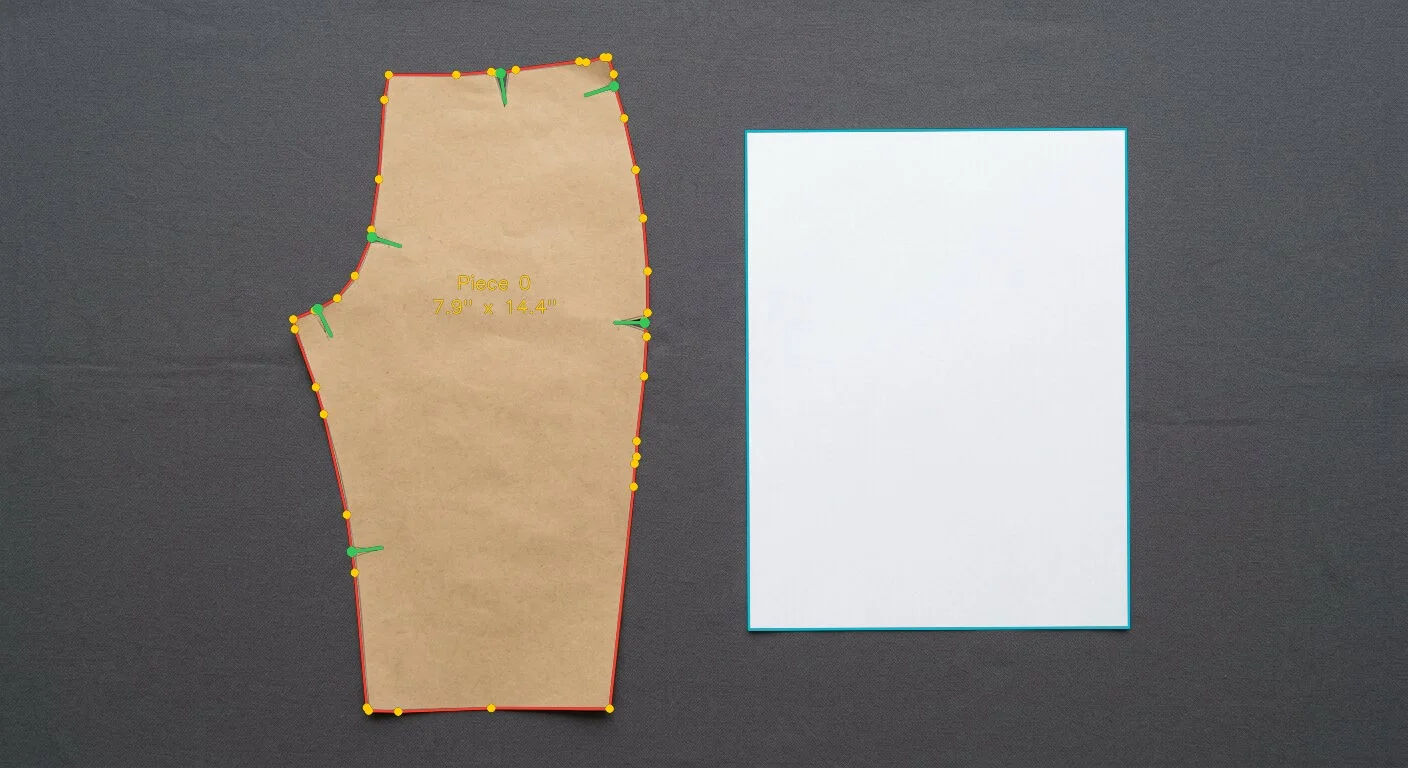
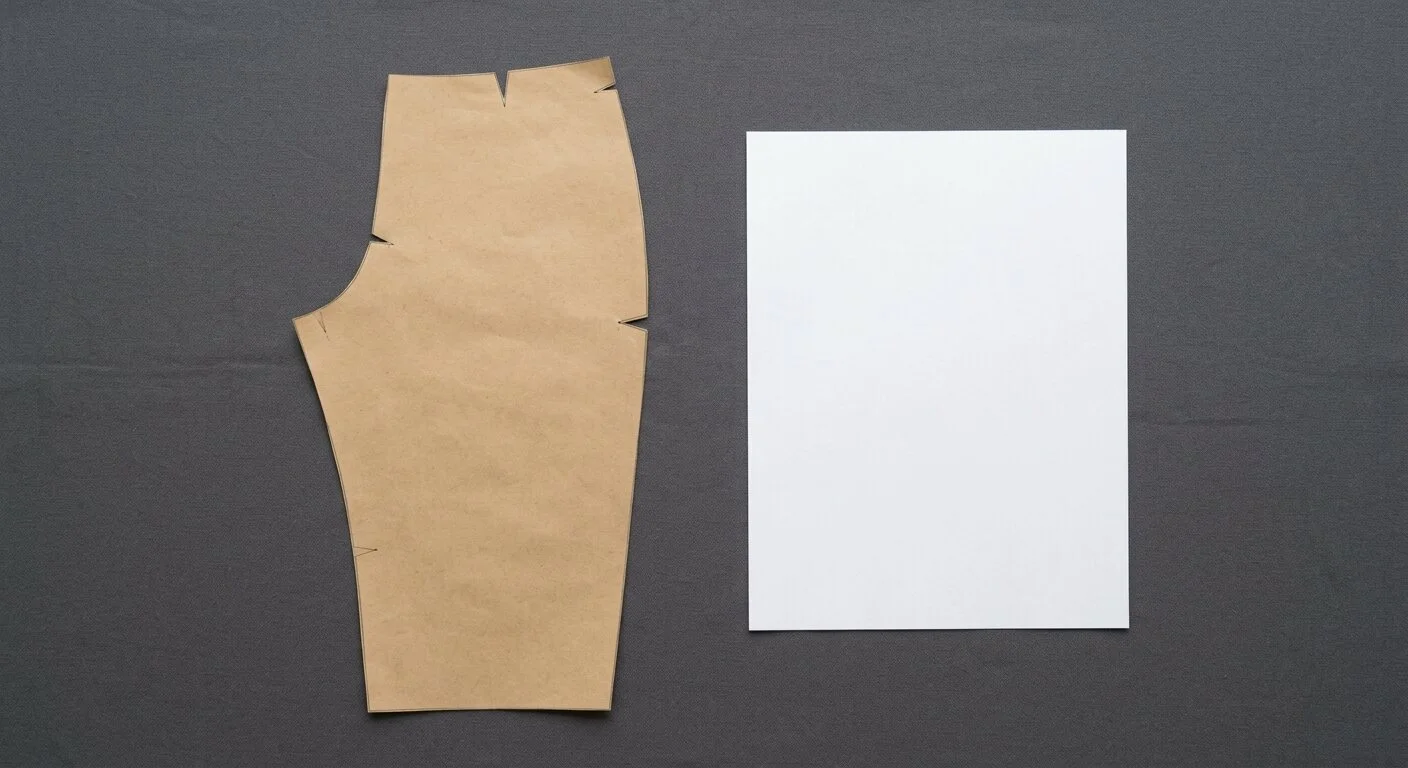
Drop your photo here
JPG, PNG or HEIC straight off your phone. One piece per photo, with a sheet of paper in frame so we know the true size. Nothing to install and nothing to sign up for.
No photo yet? Your phone takes it, this screen picks it up.
Your phone is the camera
- Point your phone camera at this code.
- Photograph your piece on the phone.
- It shows up here, on this screen.
Keep this page open while you shoot.
Your trace is ready on the big screen
Editing needs room, so finish this on a computer. Open digitizemypattern.com there and type this code:
This code works for 15 minutes.
What this code is for
Your photo is already traced and stored. The code is the key to that trace, so you do not have to email the photo to yourself or shoot it again on the computer.
What to do next
- Sit down at a computer.
- Open digitizemypattern.com in the browser.
- Press I have a code from my phone in the upload box.
- Type the six characters above and press Open it.
- Your trace opens in the editor. Correct any points that need it and download DXF, PDF and PLT.
Good to know
- The code works once, and only for 15 minutes.
- Letters are not case sensitive: ab12cd is the same as AB12CD.
- If it expires, shoot the piece again and you get a fresh code.
- Keep this screen open until you have typed the code.
Before and after
Real photo · real trace · nothing retouched
How it works
Four steps, one browser tab and about a minute of waiting. No scanner, no digitizing table, no plugin.
Lay it out
The pattern piece flat on a surface that contrasts with it, one ordinary sheet of paper beside it. That sheet is the ruler.
Shoot and upload
One photo from above with your phone. A slight tilt is fine, we straighten it against the sheet.
We trace it
The sheet sets true scale, the edge is turned into a vector outline, corners are placed and notches are marked.
Check and download
Correct anything in the browser editor, then take DXF, PDF and PLT in one archive.
No photo yet? Your phone is the camera
At a computer with the piece on the table beside you, press Shoot it with your phone in the upload box above. A code appears on this screen and you point your phone camera at it.
You take the shot on the phone, and the photo lands here by itself. Nothing to email yourself, nothing to install, and you keep working on the big screen.
What you get
Three files for every piece, in the formats the rest of your workflow already reads.
AAMA / ASTM for CAD
Cut line, notches, grain and internal lines each written to their own layer, the way apparel software expects them.
- Gerber AccuMark, Optitex, Lectra Modaris
- StyleCAD, Assyst, Seamly2D, Valentina
- AutoCAD and Fusion 360
- Piece names stay editable
Tiled for a desktop printer
The piece split across Letter or A4 sheets with a 0.4 in overlap, join marks on every edge and an assembly map on page one.
- Prints at true size, no scaling dialog
- Test square to confirm the scale
- Tape it up and cut on the floor
- Works on any home printer
Straight to a cutter
Standard HPGL with clean pen-up and pen-down moves, ready for a plotter or a cutting table.
- Graphtec, Roland, Mutoh
- HP DesignJet, rolls up to 63 in
- Cricut and Silhouette read the DXF
- No conversion step in between
If the trace is off, you fix it yourself
The editor opens in the same tab, on top of your own photo. No download, no round trip, no support ticket, and correcting costs nothing.
Drag points to nudge the outline back onto the paper edge.
Bend a segment into a true curve where the paper was creased.
Add, move or delete notches, and set the grain line by hand.
Measure any edge against the real piece before you commit.

Who it's for
The same minute-long job, four very different reasons to do it. Each one has its own page.
Small sewing factories
Move a shelf of paper blocks into CAD without booking a digitizing table or paying studio rates per piece.
See the factory page →Pattern designers
Turn hand-drafted paper into clean vectors you can grade, tile and sell as a PDF the same week.
See the designer page →Home sewing and quilting
Save a borrowed or inherited pattern before it tears, then print it at true size or cut it on a desktop machine.
See the home sewing page →Upholstery and covers
Cardboard templates for furniture, seat covers and boat canvas become files you can cut again next year.
See the upholstery page →Pricing
Nothing is charged while the demo runs. Upload, trace, edit and download as much as you like, on every piece. A US digitizing bureau lists about $7.50 a piece with a $50 minimum on every style.
Everything the service does, at no cost: unlimited pieces, DXF, PDF and PLT for each of them, unlimited edits in the browser. No card. An account only if you want your pieces kept for later.
Prices after the demo are not set yet. They will appear here before anything is ever charged.
Guides
How the work is done, written out: on paper, on a table, and from a photograph.
If you buy this as a service
What a studio charges for each part of the job, and which part of the bill you can do yourself.
By what you are making
The same method, written out for the things people copy most often.
Frequently asked
Everything people ask before their first upload.
How accurate is it?+
On a flat piece shot straight down in even light, the outline typically lands within about 0.06 in of the paper edge. The sheet in frame is what makes that possible: it fixes true scale no matter how high you held the phone.
Why does the photo need a sheet of paper?+
It is the scale reference. We measure the sheet in pixels and convert everything to real inches from it. Without the sheet you get the right shape at the wrong size, which is no use for cutting.
Do I need an account?+
No. Upload, trace, edit and download as a guest. An account exists for one reason: it keeps your pieces so you can come back and download them again later.
What if the trace comes out wrong?+
Correct it in the browser editor, or just walk away. Points, curves, notches and the grain line are all yours to move, and nothing is charged for any of it.
Will the DXF open in my CAD?+
It follows the AAMA / ASTM standard that Gerber AccuMark, Optitex, Lectra Modaris, StyleCAD, Seamly2D, AutoCAD and most other systems read directly. If yours is unusual, send us a test file and we will match it.
Do you keep my patterns?+
Signed in, your pieces stay in your account and you can download them again any time. As a guest, the photo and the result are deleted the moment your archive is downloaded, and anything you never download is removed within an hour. We do keep one working copy of the outline: what our tracer produced, what you corrected, and the photo behind it. We use it only to make the tracing better. That copy carries no name, no email and no address, and we never share it or sell it.
Still unsure? Look at what our example pattern came out as.
See the exampleTry it on the piece nearest you.
A phone, a sheet of paper and a minute. Free while the demo runs.