 digitizemypattern
How to copy a sewing pattern
Copying a sewing pattern means making a second usable copy of the shape without cutting or wearing out the original. Three ways do it: trace the piece onto paper by hand, run a tracing wheel over it onto a fresh sheet, or photograph the piece and let software return the outline as a file. The photo route takes about a minute per piece.
Updated September 3, 2026 · digitizemypattern
What do you need to trace a pattern by hand?
A sheet bigger than the piece, something to hold the pattern still and a pencil. That is the whole kit, and it is why hand tracing is still the default answer in every sewing forum.
Something you can see through
Tracing paper, medical exam paper, dot-and-cross paper or plain gift wrap turned blank side up. It has to be larger than the piece, because a join in the middle of a pattern is a join you will cut through later.
Something to stop it moving
Pattern weights, tins, mugs. Pins go through both layers and shift the tissue as you work, which is where most of the error in a hand-traced copy comes from.
A pencil and a wheel
A pencil for the outline and a tracing wheel if the original is too dark to see through. Whatever you use, the notches, the grain line and the piece name have to be copied over by hand as well.
How do you copy a sewing pattern with a phone?
Four steps, one browser tab and one sheet of printer paper. The sheet is what makes the copy come out at the right size.
Lay it flat
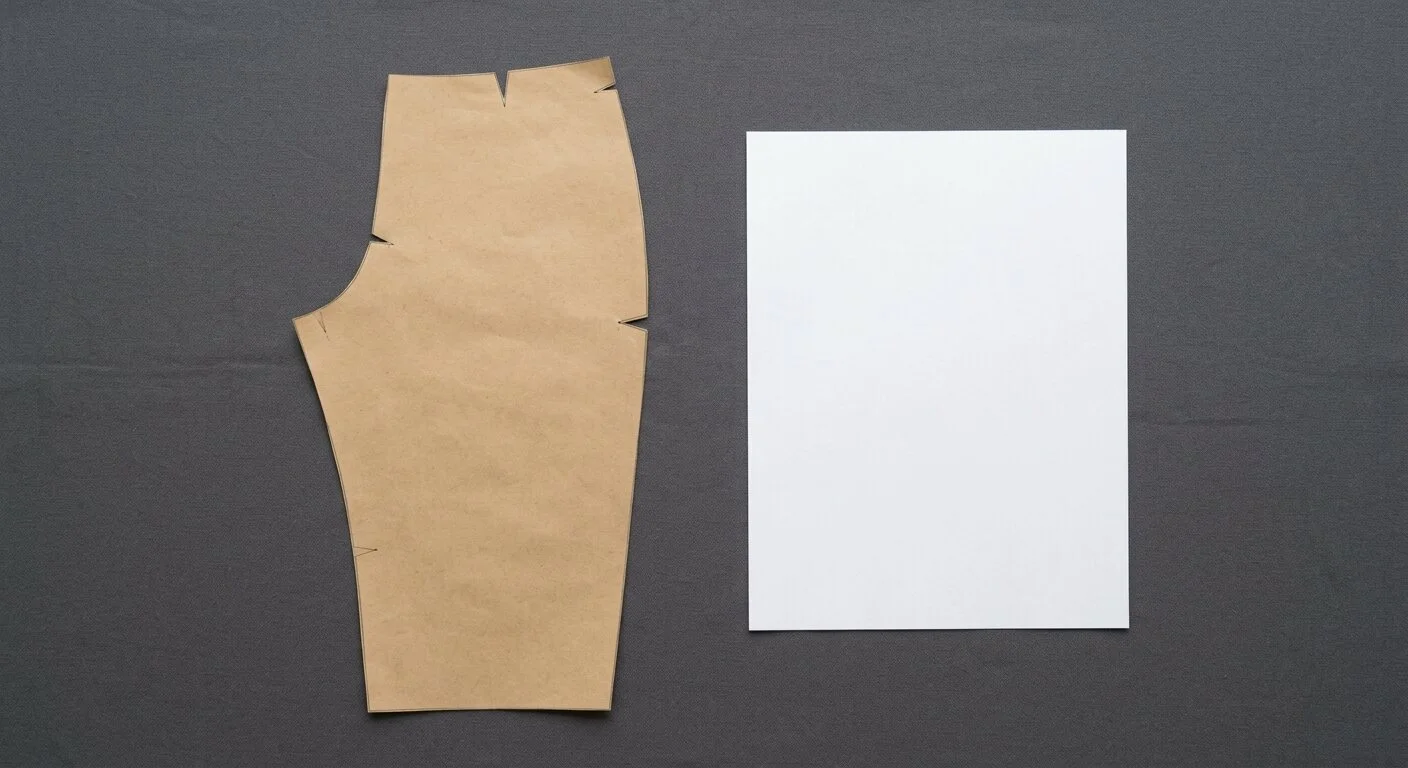
Pattern piece on a surface of a different colour, one sheet of Letter or A4 paper beside it. Flatten the folds: a crease reads as a bump in the outline.
One photo from above
Hold the phone straight over the piece and take a single picture. Nothing to measure and nothing to set up.
The outline comes back
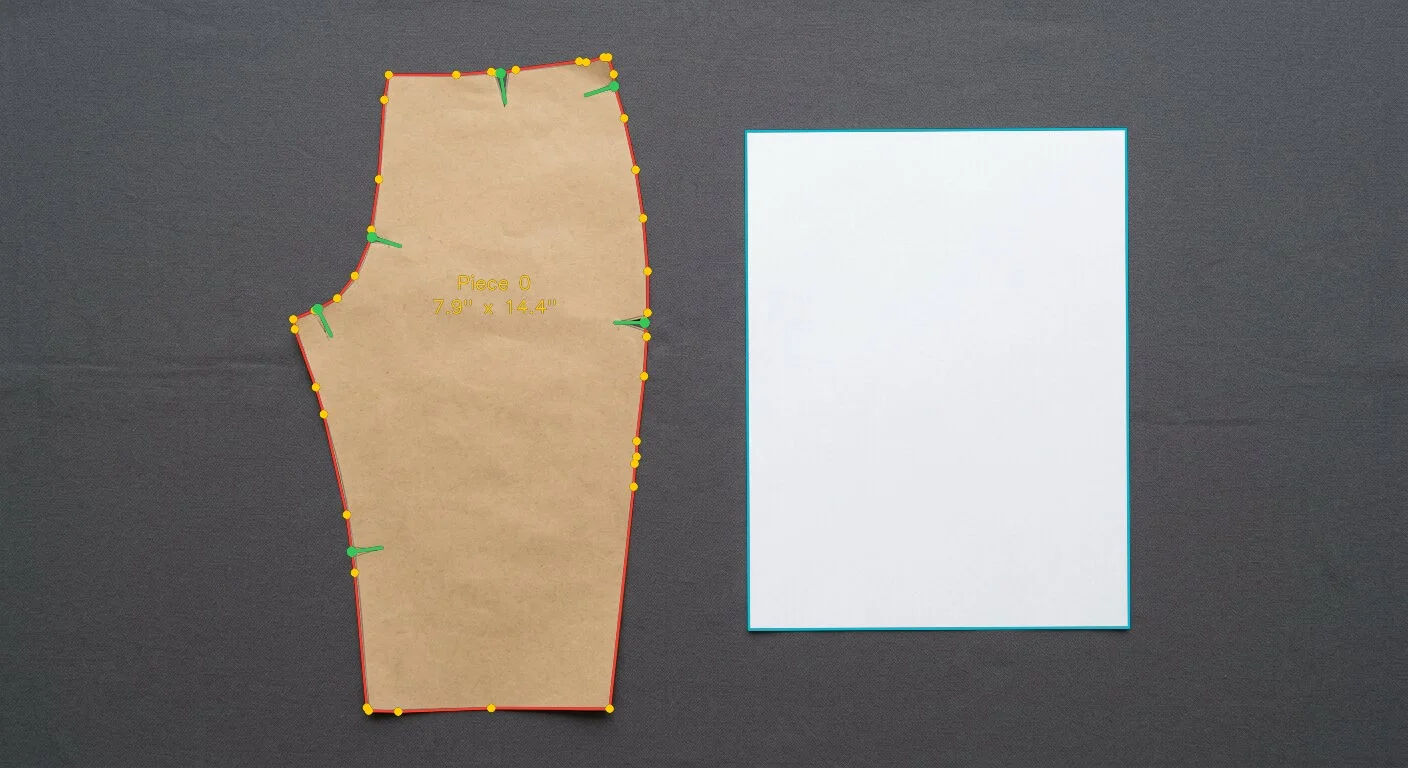
The sheet fixes the scale, the perspective is flattened and the edge is traced. Notches and the grain line are marked at the same time.
Check, then take the files
Drag any point that is not right, then download. Print page one first and measure the test square before cutting anything.
How accurate is a photographed copy?
Real photo · real trace · nothing retouched
Close enough to cut from, when the piece is flat and the light is even. On our own control photograph the automatic trace put 95 per cent of its points within 1 pixel of the paper edge and found all six notches, six out of six. At the scale of that photograph one pixel is about 0.02 in, and the figure we quote on a piece shot straight down in ordinary room light is about 0.06 in. Measured 3 September 2026 on the sample photograph published on this page.
What happens to the notches and the grain line?
Both are picked up from the photograph and kept as separate objects, not as bumps in the outline. That matters, because a notch drawn as part of the edge is a notch your cutting software will try to cut around.
Cut or drawn, both count
A notch snipped into the paper is found by its shape. A notch someone drew across the edge with a pen is found by the ink line. Either way it comes back as a mark you can move, rotate or delete in the browser.
Always present in the DXF
If a grain line is drawn on the piece it is picked up. If there is none, a default one is written into the file, because without a grain line industrial software refuses to import the notches at all.
Kept apart in the file
Outline, notches, grain line and internal marks go on separate layers of the DXF, on the AAMA and ASTM standard that Gerber AccuMark, Optitex, Lectra and StyleCAD read directly.
How long does one piece take?
About a minute from the photograph to the files, plus whatever time you spend correcting the outline. Hand tracing takes as long as the piece is large, and every notch, mark and name has to be copied across by hand at the end. We have not measured hand tracing ourselves, so we do not quote a number for it.
Can you copy a pattern you borrowed?
Copying a borrowed pattern for your own sewing is what tracing has always been for, and photographing it is the same act with a faster tool. Selling or handing round copies of a pattern somebody else drafted is a different matter, and nothing here changes it. We do not inspect what you upload and we do not decide it for you.
Questions people ask before they try it
Do I need tracing paper at all?+
Not for the photo route. You need one sheet of ordinary Letter or A4 printer paper laid next to the piece, and it is used as a ruler, not as a surface to draw on. The original never gets marked or cut.
Will the copy print at the right size?+
Yes, if you print at 100 per cent with page fitting and scaling turned off. Page one of the PDF carries a test square you measure with a ruler before cutting anything. If the square is right, the pattern is right.
What about tissue patterns you can see through?+
Put something opaque and darker underneath, such as a cutting mat or a dark towel, so the edge reads clearly against the background. Flatten the folds first, because a fold shows up in the outline as a bump.
Can I copy a pattern with several pieces?+
Yes, one photograph per piece. Each piece is handled separately, so you can start with the one you need this week and add the rest later.
What files do I get back?+
Three: a Letter or A4 tiled PDF to print and tape at home, a DXF on the AAMA and ASTM standard for sewing CAD and desktop cutters, and an HPGL PLT for plotters and cutting tables. Nothing is locked to us.
What if the outline comes out wrong?+
You correct it yourself in the browser editor. Points, curves, notches and the grain line all move, and correcting costs nothing. If it is beyond correcting, walk away and nothing is charged.
Do you keep my pattern?+
Signed in, your pieces stay in your account so you can download them again. As a guest, the photograph and the result are deleted the moment your archive is downloaded, and anything you never download is removed within an hour.
Whose bench is this
Copy the pattern you would hate to lose.
Free while the demo runs. If the outline is not right, you fix it yourself.